


When I look at a payroll and workplace-management app, I do not judge it by how polished the first screen feels. I ask a more practical question: can it help me move from “something needs attention” to “the right person has handled it” without opening a chain of confusing tools? That is the role Paychex Flex tries to fill. It is a free business app from Paychex, Inc, designed to keep employees and employers connected around everyday payroll and workplace tasks.
My impression is that it makes the most sense as a companion to an organization already using Paychex services, rather than as a standalone payroll solution for someone starting from scratch. The app gives people a mobile place to check relevant information and complete supported tasks, while the employer’s account and configuration determine what each person can actually see or do. That distinction matters: the app can make an existing process easier, but it does not replace the underlying payroll relationship.
It has been available since June 10, 2012, and the current version is 7.76.0. Its Everyone age rating also makes it suitable for a broad workplace audience. With a 4.5 average from around 77 thousand ratings and more than 5 million installs, it is clearly used at a meaningful scale, although popularity alone does not guarantee that every employee will find the workflow equally smooth.
From a payroll question to a completed task
Starting with the employee’s immediate need
A realistic use case starts with a small question rather than a dramatic payroll problem. I might be away from my desk and need to check information connected to my pay, review a workplace item, or respond to something my employer has made available through Paychex. In that situation, the value of a mobile app is obvious: I do not want to wait until I can reach a desktop computer or search through old email messages.
The first useful habit is to treat the app as the front door to an existing account. Before relying on it during a busy pay period, I would sign in when I have time, confirm that the correct employer connection is present, and look around the available areas. This is more important than it sounds because payroll apps are not identical for every user. An employee, manager, and administrator may encounter different options, and an organization may enable only part of the broader Paychex experience.
I also would not assume that installing the app automatically solves access problems. If the account invitation, sign-in details, or employer setup is incomplete, the mobile interface cannot repair that relationship by itself. The sensible approach is to finish account setup calmly, then use the app for routine access once the connection is working.
Following the information instead of chasing paperwork
Once inside, I find the biggest advantage is continuity. Rather than switching between a paper pay statement, a desktop portal, and messages from a manager, I can begin with the same mobile destination each time. That does not necessarily make every action instant, but it reduces the mental cost of remembering where a particular piece of workplace information lives.
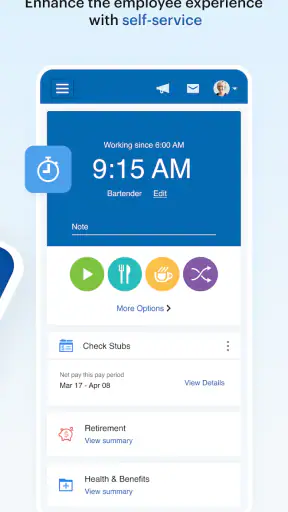
For an employee, I would use the app in short visits. I might open it before leaving work, check the item I needed, and close it again. This is a better fit than expecting a payroll application to entertain me or serve as a full office suite. Its strength is the occasional, purposeful check: open, verify, act if needed, and move on.
There is also a useful distinction between viewing and changing information. Seeing a payroll-related detail on a phone is usually straightforward when the account is configured correctly. Making a change may involve additional confirmation, employer rules, or a handoff to another person. I would therefore read the final confirmation carefully rather than assuming that tapping a button means the request is already approved or reflected in payroll.
A practical workflow for a busy workday
Imagine a retail employee who notices a payroll question after a shift. The employee opens Paychex Flex, checks the available information, and identifies whether the issue is a missing detail, a misunderstanding, or something that needs employer attention. If the app provides the relevant action, the employee submits it from the phone. If not, the employee has at least narrowed the question before contacting a manager or payroll administrator.
That narrowing step is one of the less obvious benefits. A good mobile payroll workflow does not have to answer every question directly to be useful. It can help separate “I need to look at my own information” from “my employer must correct or explain something.” In practice, that can make a conversation with payroll more focused because I am no longer starting with a vague complaint.
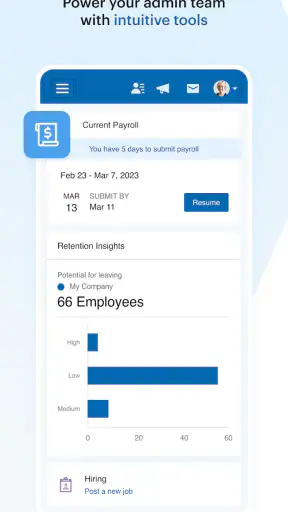
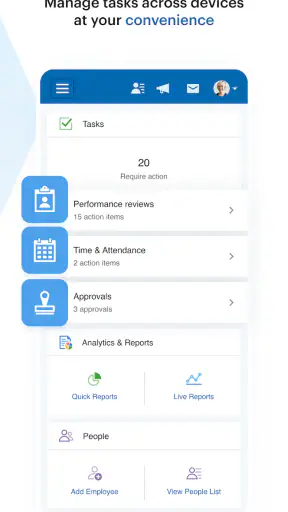
For managers, the workflow can work in the opposite direction. A manager may receive or review an employee-related item, decide what belongs with payroll, and pass the matter along. The app’s usefulness then depends on clear ownership. If I submit something without knowing who handles the next step, the mobile convenience stops at the point where the real work begins.
The handoffs are where the app earns its place
Payroll is rarely a one-person process. An employee supplies information or raises a question, a manager may review it, and a payroll or human-resources contact may complete the official action. Paychex Flex is most helpful when those handoffs are already understood inside the organization. The app can provide a common channel, but it cannot invent a clear internal policy for a workplace that has not decided who approves what.
I would use a simple rule: after submitting anything important, note what outcome I expect and who should provide it. If the app shows a confirmation, I would keep that reference in mind. If the matter still requires a manager or payroll team, I would not treat the submission as finished merely because the screen returned to the main area.
This is especially important around deadlines. A mobile request made late in the day may be convenient for the employee but still arrive too late for an employer’s processing cycle. The app can shorten the distance between the user and the organization; it does not remove the organization’s schedule. Anyone dealing with a time-sensitive correction should check the employer’s own instructions rather than relying on the app alone.
Another handoff involves support. When something looks wrong, I would first check whether the issue is account access, missing employer configuration, or an actual payroll discrepancy. Those are different problems. Sending a vague message such as “the app is not working” can create unnecessary back-and-forth. Describing the screen, the task attempted, and the expected result gives the responsible person a much better starting point.
What the completed result looks like
The best outcome is not simply that I managed to open the app. It is that I finished with a clear answer or a clearly owned next step. For a routine check, that may mean I found the information I needed and did not have to contact anyone. For a request, it may mean I submitted the item and know which person or department handles the follow-up.
This is where I see the app’s strongest everyday value. It supports small moments that otherwise create friction: checking something outside office hours, reviewing a workplace detail while away from a computer, or starting a conversation with payroll from a more informed position. Those moments are not glamorous, but they are exactly where a mobile business app can save time.
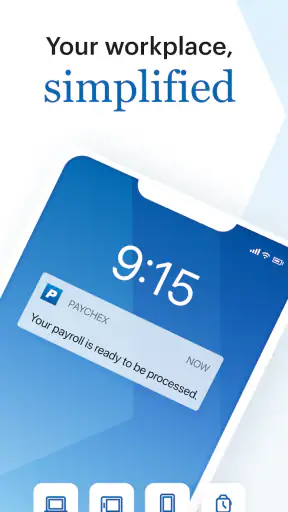
The result also depends on notification habits and personal discipline. I would not assume that every important development deserves an immediate phone alert or that every employer uses the same communication pattern. Instead, I would make a routine of checking the app when a pay period or workplace deadline matters, while continuing to follow direct instructions from the employer.
Where the flow breaks
The first weak point is dependence on employer setup. If the organization has not enabled the area I need, the app may feel incomplete even though it is working as intended. This can be frustrating for users who expect one universal dashboard. In reality, the experience is shaped by the employer’s Paychex arrangement, permissions, and internal process.
The second weak point is that mobile convenience can encourage false confidence. A clean confirmation screen may make a task feel final when another person still needs to review it. I would be especially careful with anything involving a correction, approval, or deadline. The app is a strong starting point and access point, but the official business outcome may still depend on a separate workflow.
There is also a trade-off between concentration and breadth. A dedicated payroll app is easier to justify than a collection of unrelated workplace tools, but users may still find that the information they want is divided among different areas or requires a few steps to reach. On a phone, those extra taps matter more than they do on a large monitor. If I only need a quick glance, the app is convenient; if I need to investigate a complicated history, a desktop browser may be more comfortable.
Compared with email, Paychex Flex has the advantage of keeping the task closer to the relevant account and workplace context. Email remains better for a detailed explanation or a conversation that needs attachments and a visible written trail. Compared with a generic employee portal in a browser, the app is more natural for quick mobile checks, while the browser can be preferable when I need a wider view or several windows open at once.
It is also different from a personal finance app. A budgeting tool can categorize spending and combine accounts, but it does not serve as the employer-connected place for payroll information. I would not install Paychex Flex expecting budgeting, investment analysis, or a complete replacement for every human-resources service. Its purpose is narrower and more practical.
Who will get the most from it
I think the app is a good match for employees who already use Paychex through work and want a convenient mobile route to their available workplace information. It is particularly useful for people who are often away from a desk, work varied shifts, or prefer checking a phone rather than signing in through a computer. Managers may also appreciate having a mobile access point when their role includes reviewing or coordinating employee-related items.
It is less suitable for someone looking for an independent payroll system for a small business without an existing Paychex relationship. It is also not the right choice if the main need is advanced accounting, detailed workforce analytics, project time tracking across unrelated systems, or personal budgeting. In those situations, a dedicated tool built around that specific job may offer a clearer experience.
Employers should set expectations before asking staff to use it. A short internal explanation of who handles requests, which tasks are available, and when employees should contact payroll directly would make the app much more effective. Without that guidance, workers may interpret a missing option as an error or assume that a submitted request has already been approved.
Small habits that make the experience better
My first tip is to explore the app before an urgent pay question appears. Knowing where the main information areas are reduces stress later, especially for employees who rarely use workplace software. I would also keep account recovery details current and avoid waiting until a deadline to discover that access needs attention.
My second tip is to separate checking from escalating. First inspect the information available in the app. Then decide whether the issue is something I can resolve there or whether it belongs with a manager, payroll contact, or human-resources team. This two-stage approach prevents unnecessary support requests and produces clearer conversations when help is genuinely needed.
My third tip is to treat every handoff as a checkpoint. After an action, I would ask myself: what did I submit, what should happen next, and who owns that next step? That simple habit is valuable because the app can streamline communication without making organizational responsibility visible in every situation.
My fourth tip is to use the mobile app for short, well-defined jobs and move to a larger screen when the task becomes investigative. Reading a single item on a phone is comfortable. Comparing several records, composing a detailed explanation, or tracing a complicated issue may be slower on a small display. Choosing the right device is part of getting a good result.
My overall experience
Paychex Flex succeeds when I use it as a focused mobile bridge between an employee and an existing Paychex workplace account. It can save time by putting routine access closer at hand, and its broad adoption suggests that many people find that role worthwhile. The free price also removes a separate app cost for users who already have access through their employer.
Still, I would not describe it as a magic solution for payroll confusion. The quality of the experience depends heavily on employer configuration, account access, internal deadlines, and the clarity of the handoff after a request. Those are not minor details; they determine whether the app feels like a completed workflow or merely another place to begin one.
My recommendation is straightforward: if your employer uses Paychex and you regularly need mobile access to workplace information, installing it is sensible. Give yourself time to learn the available sections, understand which actions are actually enabled, and identify the right person for follow-up. If you need a standalone payroll platform or a full financial-management tool, I would choose something designed for that purpose instead.
In the right setting, the app does what its “save time and stay connected” idea promises in a grounded way: it reduces the distance between a question and the information or person needed to resolve it. The most important benefit is not any single screen. It is the possibility of moving through the complete path—from checking a detail, to submitting or clarifying an issue, to handing it to the right owner, and finally knowing what happened next—with less unnecessary friction.


